If you want to know how to write a Substack post faster, stop treating newsletter day as the day you begin. Collect material through the week, choose one angle before you draft, and write from a short outline instead of a blank page.
You can do that with notes, bookmarks and email folders. It gets easier when the sources you follow, the reading you save and the first draft all live in one workflow.
Use a weekly routine, not a one-day scramble
Most weekly Substack issues feel slow for two reasons:
- your research is scattered across tabs, newsletters, articles and videos
- you try to decide what the issue is about while writing the opening
A faster method splits the work across the week. By the time you sit down to write, you are selecting and shaping, not hunting for material.
Here is the basic pattern:
| Stage | When | Output |
|---|---|---|
| Collect | 10 to 15 minutes a day | saved items and quick notes |
| Choose | the day before writing | one clear angle |
| Outline | 10 minutes | a simple structure |
| Draft | 30 to 60 minutes | rough issue |
| Edit | 15 to 30 minutes | final post |
The weekly routine
1. Collect material through the week
Your job during the week is not to half-write the issue in fragments. It is to notice items worth using later.
Save material in three buckets:
- must mention: stories your readers would expect you to cover
- maybe: useful links, examples or quotes
- supporting evidence: figures, transcript lines or source passages you may cite
Keep this light. Add one line on why the item matters. If you cannot explain why you saved it, it probably is not ready to help your issue.
Do it with Repurai
In Repurai, follow the public sources you already rely on: websites, Substack newsletters, Medium publications, beehiiv or Ghost newsletters, YouTube channels, subreddits, Hacker News, GitHub releases and more. You can paste a link, search by topic, or import your list of sources from another reader.
Put them in a Space for the newsletter topic you cover each week. That gives you one place to scan new posts and save the ones you may use.
Repurai checks followed sources about every hour, and you can refresh manually too. If one source is noisy, add a feed filter to hide posts by keyword, author, link or length without deleting the source.
If you just need to check whether one article is worth your time before saving it, the free Article Summarizer can help you triage it quickly.
2. Read to triage, not to finish
The usual time sink is reading everything in full. You rarely need to do that.
For each saved item, make one decision:
- ignore it
- keep it as background only
- move it into this week's candidate list
Summaries help at this stage because they let you decide what deserves a full read. But if you plan to repeat a claim, quote, number or argument, check the original source before you publish.
In Repurai, open your Space in Today view to see what was published today in your timezone, or search across everything you follow when a theme starts emerging. AI summaries help you triage articles, and YouTube videos can be summarized from their transcript when captions are available.
If you want a lighter research habit, set a scheduled email digest for the Space you use for your newsletter. A daily or weekly digest can bring together the latest posts from that Space and open with a short overview of the stories. That gives you a prepared reading list instead of another blank inbox. It is optional help, not a substitute for checking the source.
3. Pick one angle for the issue
This is the step that makes writing faster.
Do not ask, "What happened this week?" Ask one narrower question:
- What changed that matters most?
- What pattern connects these stories?
- What did people miss about the headline item?
- What should my reader do differently after reading this?
A weekly issue gets easier when it has one central sentence behind it. For example:
- "This week's launches point to cheaper distribution, not better quality."
- "The real story is not the product update. It is who the company now serves."
- "Three small releases show the market moving toward workflow tools, not standalone tools."
Once you have that sentence, selection gets easier. Anything that does not support the angle can wait for another issue.
If you are torn between angles, pick the one that lets you add judgment, not just summary. A useful newsletter is not a pile of links. It is your view of which links belong together and why.
Repurai's Ask mode can help here. Ask your own sources a question such as, "What themes came up across my sources this week?" or "What did these three newsletters say about the same release?" Answers come only from the sources you follow and cite the posts, so you can spot a pattern and still go back to the originals.
4. Outline before you draft
A short outline is enough. You do not need a perfect structure.
How to write a Substack post faster with a simple issue template
Use this illustrative template for a typical weekly issue:
Subject line
One clear promise about the main angle
Opening
2 to 4 sentences on what happened and why it matters
Main section
Your take on the biggest story or pattern of the week
Supporting items
2 to 4 shorter items that reinforce, contrast with or complicate the main point
What to watch next
One question, risk or expected next move
Closing
A brief sign-off or one takeaway
If your newsletter is more curated than essay-like, this version may fit better:
- lead story and your take
- three links worth your reader's time
- one quote, chart or transcript line
- one thing you are watching next week
The key is to choose the shape before you start drafting paragraphs.
5. Draft in one pass
Now draft quickly from the outline. Do not stop to edit every sentence.
Aim to get these parts down first:
- your opening claim
- the logic that connects the items
- the transitions between sections
- one or two lines that sound unmistakably like you
If you still need to confirm a detail, leave a note to yourself instead of inventing text. For example:
- check exact figure
- verify quote in source
- add source link here
That is much faster than breaking your drafting flow every two minutes.
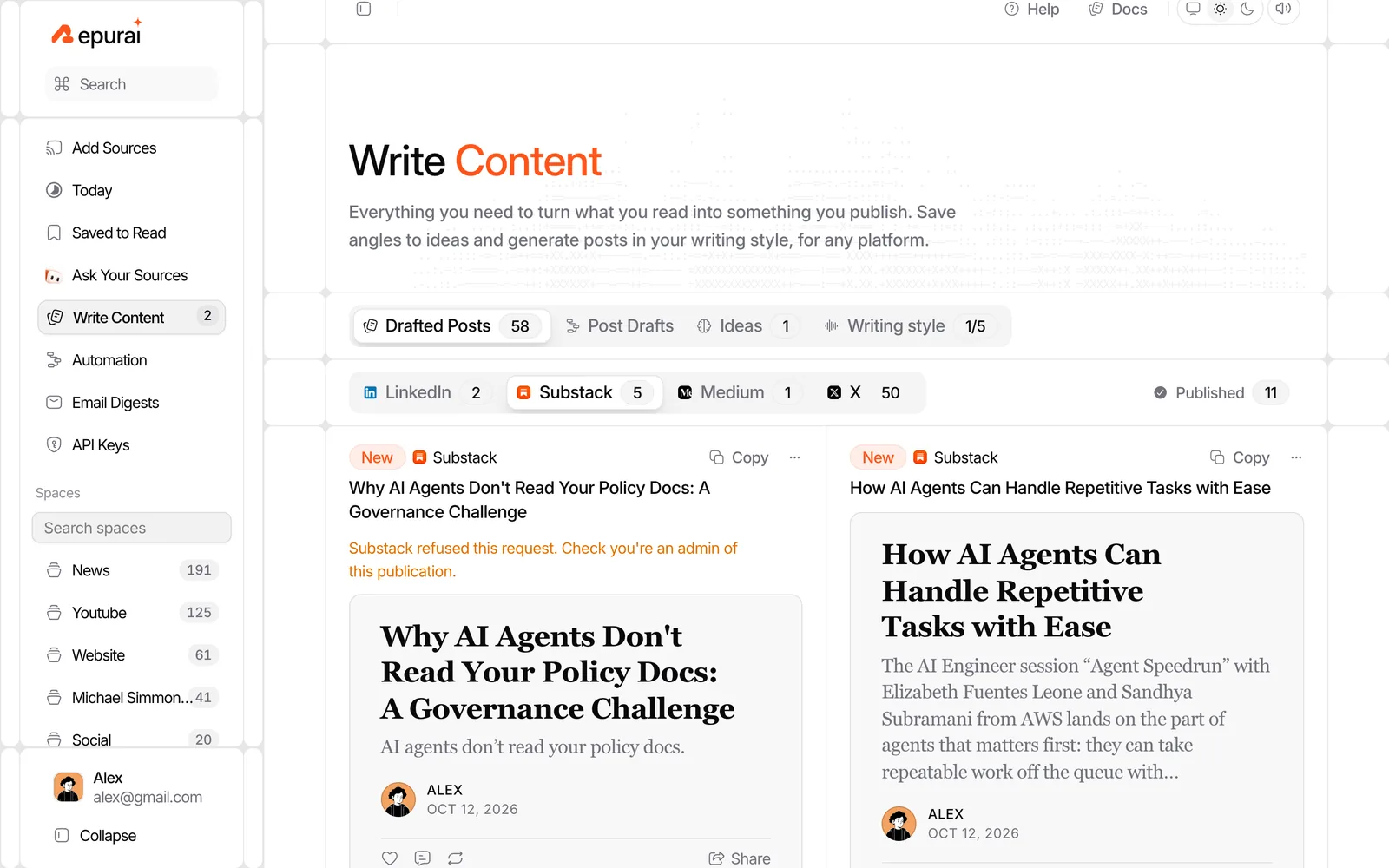
In Repurai, you can create a Substack draft from an article, a saved idea or an answer from Ask. If you set Your Voice from a few pasted samples, the draft follows your Substack style rather than a generic tone. You can also add standing instructions such as "British English" or "no emoji" if those are part of how you write.
Treat that draft as a first pass. Keep the parts that sound like you, rewrite the flat parts, and verify factual claims against the original sources.
If keeping your tone is the hard part, read How to keep your voice in AI-written drafts.
6. Edit in two passes
Editing is faster when you split it into two jobs.
Pass 1: structure
Check:
- does the opening state the point quickly?
- does every section serve the main angle?
- can any item be cut without loss?
- are the links in the right order?
Pass 2: line edits
Check:
- remove repeated points
- replace vague phrases with specifics
- shorten long scene-setting
- verify names, dates, figures and quotes
- make the ending land on one takeaway
If you draft in Repurai and then move the final text into Substack, your research, saved items and draft versions stay close together while you edit.
A simple schedule you can copy
Monday to Thursday
- spend 10 to 15 minutes scanning new items
- save anything that may matter
- add one line on why it matters
Thursday or Friday
- review saved items
- choose one angle for the issue
- cut anything that does not support it
Writing day
- make a 5-part outline
- draft in one pass
- edit for structure
- edit for accuracy and style
- publish in Substack
If you use Repurai, a practical setup is:
- one Space for your newsletter topic
- Saved to Read for candidate items
- an optional scheduled digest for that Space
- Ask mode for finding patterns across the week
- Substack drafts for the first pass in your voice
Copy checklist
Use this before every issue.
Weekly newsletter checklist
- I saved possible material during the week
- I chose one main angle
- I cut items that do not support that angle
- I wrote a short outline before drafting
- I drafted without editing every sentence
- I checked the original source for claims I used
- I edited once for structure and once for style
- I published only after the issue sounded like me
Limits
This routine will not fit every issue.
It is less useful when:
- you are writing a deeply reported essay that needs fresh interviews or original research
- the issue depends on one fast-moving story that may change right before publication
- your process is intentionally exploratory and you think on the page rather than from an outline
You can still save time by collecting source material through the week, but the angle may need to stay open longer.
Also, summaries and AI drafts help you move faster, but they do not replace source checking. Some videos do not have captions, so there may be no transcript-based summary for them.
Do it with Repurai from start to finish
A simple weekly setup in Repurai looks like this:
- Create one Space for your newsletter topic.
- Follow the websites, newsletters, channels and other public sources you already trust.
- Scan that Space during the week and save likely candidates.
- Use search or Ask mode to find the pattern behind the week.
- Generate a Substack draft from an article, idea or answer.
- Edit the draft, verify the claims, then copy it into Substack to publish.
You can set that up at repurai.com/signup. If you want the product walkthrough first, use the quickstart documentation.
FAQ
How long should a weekly Substack writing routine take?
For many weekly writers, the fastest setup is a little time during the week and one focused writing session. The exact timing varies, but collecting continuously is usually much faster than doing all research on publication day.
Should I draft directly in Substack or somewhere else first?
Either can work. If the blank page slows you down, drafting first in a separate workspace can make it easier to outline, get a rough version down and edit before moving the final text into Substack.
Can AI help me write a Substack post faster without making it generic?
Yes, if it starts from your own sources, your outline and your voice. It works badly when it tries to invent a whole issue from nothing and you publish it without checking the source claims or rewriting the flat parts.