If you want to know how to write a newsletter with AI, the useful split is simple: let AI collect and summarize what your sources published, and let it draft in your voice, but keep story choice and opinion for yourself. That way you write faster without sending a generic issue that could have come from anyone.
For a weekly curated newsletter, the slow part is usually not the writing. It is checking dozens of sites, channels and newsletters, deciding what mattered this week, and turning your notes into a clear issue. AI can help a lot here, but only if it works from your own source list and shows you where each claim came from.
The right split between you and AI
Here is the split that tends to work.
| Task | AI should do it? | Why |
|---|---|---|
| Check your source list for new posts | Yes | Repetitive, time-based work |
| Summarize articles and videos | Yes, as triage | Helps you scan faster, but you still check important claims |
| Pull cited answers from this week's sources | Yes | Good for finding patterns and links across the week |
| Choose the stories for the issue | No | This is your judgment |
| Decide the angle and what readers should care about | No | This is your value |
| Draft sections in your voice | Yes | Saves time once you know what you want to say |
| Final edit, nuance and opinion | No | This is where voice becomes real |
If you skip that split, an AI newsletter writer usually does the weakest possible thing: it invents a generic issue from a blank box. You save typing, but lose curation.
A practical workflow for a weekly curated issue
You can do this manually with bookmarks, email folders and notes. A better setup is one place to follow all your sources, get a weekly digest, ask questions across the past week, and draft the issue in your own style.
In Repurai, the path is Follow, Read, Ask, Write, Publish. For a newsletter, you mostly need the first four.
1. Create one Space for your newsletter beat
Make one Space for the topic your newsletter covers. A Space is just a source collection by topic, client or project.
For example:
- AI tools for marketers
- Developer tools and model launches
- Climate tech funding and policy
- B2B SaaS product design
Then add the sources you already trust. You can follow a source by pasting a link, searching for a topic, or bulk-importing your list of sources from another reader.
Supported sources include:
- Substack newsletters
- beehiiv and Ghost publications
- blogs and websites
- YouTube channels
- Reddit communities
- Hacker News
- GitHub releases and repositories
- Google Scholar and arXiv
- Bluesky and Mastodon
This matters because a newsletter curation tool is only as good as the source list behind it. Start with the same people and sites you already cite.
A good first pass is 20 to 50 sources. Enough to cover the beat, not so many that every issue becomes a link dump.
2. Clean the feed before the week starts
Most curated newsletters get noisy for predictable reasons: job posts, event listings, release notes, short link posts, duplicate cross-posts.
Use feed filters to hide things you never want in your issue, such as:
- posts with "jobs" in the title
- posts shorter than your minimum useful length
- recurring event announcements
- cross-posts from the same author you already follow elsewhere
This step is underrated. If you want to automate newsletter curation without losing quality, your source list and filters matter more than your writing prompt.
3. Set a weekly email digest for that Space
Create a weekly email digest for the Space. Pick the day and hour when you usually plan the issue. The digest opens with an AI-written overview of the stories in that Space.
Use the digest for one thing only: your first pass.
Read it to answer three questions:
- What came up repeatedly this week?
- Which items changed the conversation, not just filled it?
- Which links deserve a full read before I decide?
The digest overview is useful because it compresses the week. But do not treat it as publication-ready copy. Treat it as your scan of the terrain.
If you only need a simple daily email digest of websites you follow, this also works. For a weekly issue, though, a weekly digest is the better planning view.
4. Ask for a cited summary of the past week
Next, use Ask with the Space set to your newsletter beat and the time range set to past week.
Useful prompts:
- What were the three most discussed themes in the past week?
- Which sources published genuinely new information this week?
- What did my sources disagree about this week?
- Which product launches had evidence of adoption, not just announcements?
- What did my sources publish this week that my readers would miss if they only read headlines?
Ask answers from your own sources and cites the posts. This is the step that fixes the biggest problem with many AI newsletter generator tools: you can trace statements back to what was actually published.
Use the answer to shortlist stories, not to replace reading. Open the cited posts that you may include, and check the original wording for any claim you might repeat.
5. Choose the issue yourself
Now decide the issue structure. This is where your newsletter stops being generic.
A simple weekly issue usually needs:
- One lead story you think mattered most
- Two to four supporting items
- One short section of notable links, tools or releases
- Your take on what changed and what to watch next
Keep asking: if I remove my opinion from this issue, does anything unique remain? If the answer is no, you are still summarizing, not curating.
An illustrative issue outline
Use this as a starting template.
Subject line
What changed in AI developer tools this week
Intro
One paragraph on the week's shift. Example: "This week was less about headline model launches and more about tools becoming easier to ship inside real products. The important pattern was not bigger claims. It was more signs of teams tightening the gap between prototype and production."
Lead story
- What happened
- Why it matters
- The evidence or source behind it
- Your opinion or caution
Three supporting stories
For each one:
- 1 to 2 sentence summary
- One specific detail worth knowing
- One line on why you included it
Worth your time
A short bullet list:
- one article
- one video
- one release note or repo
- one contrarian take
Closing note
What you are watching next week, or the question readers should keep in mind.
This outline works whether you publish on Substack, Ghost, beehiiv or send an email newsletter another way.
Do it with Repurai
Once you have your shortlist, use Write to create a Substack or Ghost draft.
The useful setup is:
- add a few of your past newsletter issues to Your Voice for that platform
- set post instructions with your standing rules
- generate from an article, idea or cited chat answer
Good post instructions for newsletters often include rules like:
- British English
- no emoji
- short paragraphs
- do not overstate uncertainty as certainty
- keep links attached to the claim they support
- include a brief editor's note style intro
- sound analytical, not promotional
Then ask for a draft with enough structure to be editable. For example:
"Draft a weekly curated newsletter for Substack in my voice. Use this outline: intro, lead story, three supporting stories, worth your time, closing note. Base it only on the stories I selected. Keep source-specific facts attached to the relevant item. Leave clear spots for my opinion where needed. Do not invent transitions that imply causation unless the sources support it."
Repurai can create drafts sized for Substack or Ghost, using the voice it learned from your examples and your saved instructions.
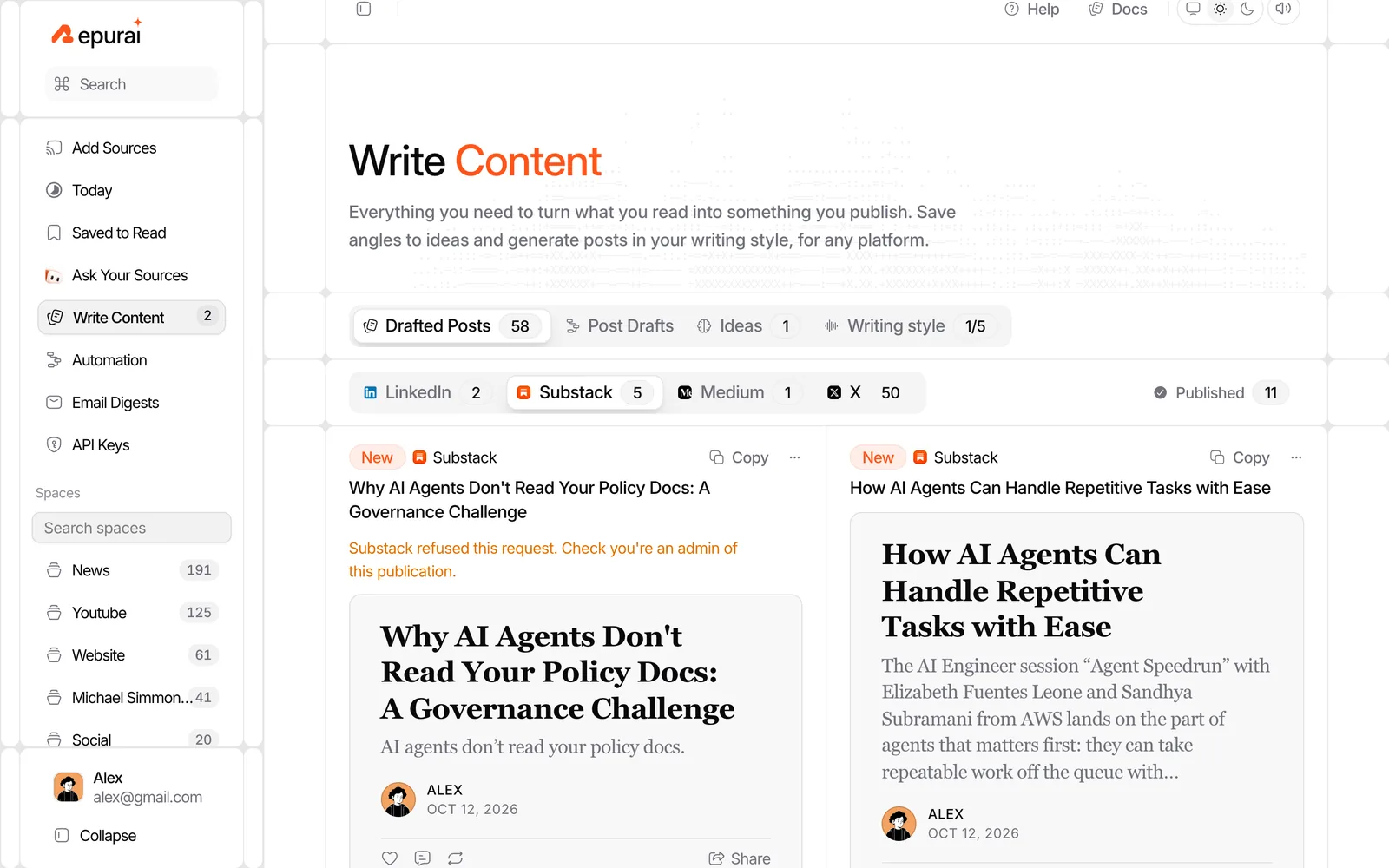
At this point, you should have a strong first draft, not a finished issue.
Checklist for editing an AI draft
Copy this into your own process.
AI newsletter draft edit checklist
- Have I removed any story that is merely interesting, not important?
- Does every factual claim come from a source I actually checked?
- Did the draft flatten disagreements between sources that I should name clearly?
- Is the lead item really the lead, or just the easiest one for AI to summarize?
- Have I added my own judgment on why each item matters?
- Does the intro say what changed this week, not just what happened?
- Are there any vague phrases like "game-changing", "revolutionary" or "major shift" with no evidence?
- Did the draft copy the source's framing when I disagree with it?
- Have I cut filler transitions and repeated setup lines?
- Does the issue sound like my newsletter, or like a generic roundup?
- Are links and references attached to the right claim?
- Have I rewritten the final paragraph so it leaves readers with a real point of view?
If the draft sounds polished but empty, that is normal. AI is good at smooth text. Your edit is where the publication gets a brain.
Common variations
If your issue is mostly links
Use AI for summaries and a cited past-week answer, then write each one-line recommendation yourself. Your taste is the product.
If your issue is one main essay plus links
Use the weekly digest and Ask to find the supporting evidence, then draft only the link roundup with AI. Write the essay section yourself.
If you publish on beehiiv
Repurai writes drafts for Substack, Ghost, Medium and X. If your workflow ends in beehiiv, you can still use Repurai for source collection, digest, cited answers and a draft you copy into your newsletter editor.
If you cover videos heavily
Follow the relevant YouTube channels too. Repurai summarizes videos from their transcript when captions are available. If you need a quick one-off summary before adding a source, the free YouTube Video Summarizer helps you triage a single video.
Limits
This does not work well if your source list is weak, too broad or full of duplicate commentary. AI will only reflect the inputs you give it.
Summaries help you triage, but original claims still need checking. Some YouTube videos have no captions, so there may be no transcript-based summary. And if key reporting sits behind a paywall you cannot access, you should not assume the summary has details you never saw.
Some features depend on your plan, so if you need specific automation or delivery options, check /pricing.
If your problem is mostly collecting the week rather than shaping the issue, the follow-up article Write a weekly AI newsletter faster goes deeper on the research side.
FAQ
Can AI write my whole weekly newsletter for me?
It can, but the result is often generic. The better use is to let AI collect, summarize and draft from your own sources, while you choose the stories and write the opinion.
How do I keep my voice when using an AI newsletter writer?
Give the tool examples of your past issues, set clear standing instructions, and edit the final draft for judgment, emphasis and tone. Voice is not only phrasing. It is what you choose to notice and what you think it means.
What is the fastest way to turn website updates into a newsletter?
Follow the sites, channels and newsletters you trust in one place, get a weekly digest, ask for a cited summary of the past week, shortlist the items yourself, then draft the issue from those selected sources. If you need to check whether a site can be followed at all, try the free Website Update Checker.
Ready to try the workflow in one place? Start here: /signup