If you want to know how to curate content for a newsletter, the simplest answer is this: follow the sources where news appears first, collect promising items all week in one place, triage them quickly, then choose only the links your readers will care about and add one sentence saying why each matters. A good curation process is less about finding more links and more about making better decisions faster.
For a weekly curated newsletter, you do not need to read everything. You need a system that helps you notice new stories early, shortlist the few worth keeping, and turn that shortlist into a clean issue.
The 5-step curation system
Use this workflow every week:
- Choose sources where news breaks first
- Collect all week in one place
- Triage fast with summaries and skim reading
- Pick by reader relevance, not just novelty
- Add one line of commentary per link
That is the whole job. The rest is setup.
1. Choose sources where news breaks first
Most newsletter curation gets slow because the source list is wrong. If you mostly check commentary sites, you hear about a story after everyone else. Start with primary or early sources instead:
- company blogs and release notes
- niche blogs that publish original reporting
- industry newsletters with strong links sections
- YouTube channels that interview builders or publish demos
- GitHub releases or repositories for product changes
- subreddits and Hacker News for early discussion
- Google Scholar or arXiv if your field moves through papers
Then add a smaller layer of interpretation sources:
- analysts n- thoughtful bloggers
- subject experts on Bluesky or Mastodon
- competitors in your niche
A simple rule helps: if a source mostly reacts to other people's reporting, it is useful context, but it should not be your main discovery layer.
2. Collect all week in one place
You can do this manually with bookmarks, notes, tabs, and inbox flags. It works, but it tends to fail by Thursday.
A better method is to keep every source you follow in one place, split by newsletter section. For example:
| Newsletter section | What to follow |
|---|---|
| Main stories | company blogs, key reporters, release notes |
| Tools and launches | product blogs, GitHub releases, YouTube demos |
| Commentary | analysts, opinion newsletters, expert blogs |
| Research | papers, lab blogs, Google Scholar |
| Community signal | Reddit, Hacker News, niche forums |
That way, you are not building each issue from scratch. You are reviewing a system that is already organized around your format.
Do it with Repurai
In Repurai, start by creating one Space for each recurring section of your newsletter, or one Space for the whole newsletter if your issue is short.
You can add sources in three useful ways:
- Paste a link to a source and Repurai finds the updates from that site or channel
- Search by topic to discover blogs, newsletters, channels, and other public sources already related to your niche
- Import your list of sources from another reader by pasting links in bulk or uploading an OPML file, which is a file that contains your source list
Repurai supports public sources such as YouTube channels, Substack, Medium, beehiiv, Ghost, WordPress and other blogs, subreddits, Hacker News, GitHub releases and repositories, Google Scholar, arXiv, Bluesky and Mastodon, depending on what each platform makes publicly available.
Once saved, your sources are grouped into Spaces and checked automatically about every hour. You can also refresh manually if you are waiting on a known announcement.
For a fast setup, keep it simple:
- Space 1: Top stories
- Space 2: Tools and products
- Space 3: Opinion and analysis
- Space 4: Research or data
If you already have too many sources, cut first. Twenty strong sources are better than a hundred mediocre ones.
3. Triage fast with summaries and skim reading
The biggest time sink is opening every item in full. Most links are not newsletter material. They may be fine, but not right for your readers this week.
A good triage pass asks only three questions:
- What happened?
- Why does it matter?
- Is this new enough, useful enough, or surprising enough to include?
Use summaries for speed, then check the original piece before repeating specific claims.
A simple triage routine:
- Scan everything published today or this week
- Open only items with a strong headline or obvious relevance
- Read the summary first
- Save only the items that survive first-pass review
- Return later to read the shortlist properly
If you just need a quick one-off summary of a link before deciding, Repurai also has a free Article Summarizer.
Do it with Repurai
Repurai has a Today view that shows what your sources published today in your timezone, which is useful when you are doing a daily scan across many sites.
Use these features during triage:
- Today view to scan fresh items
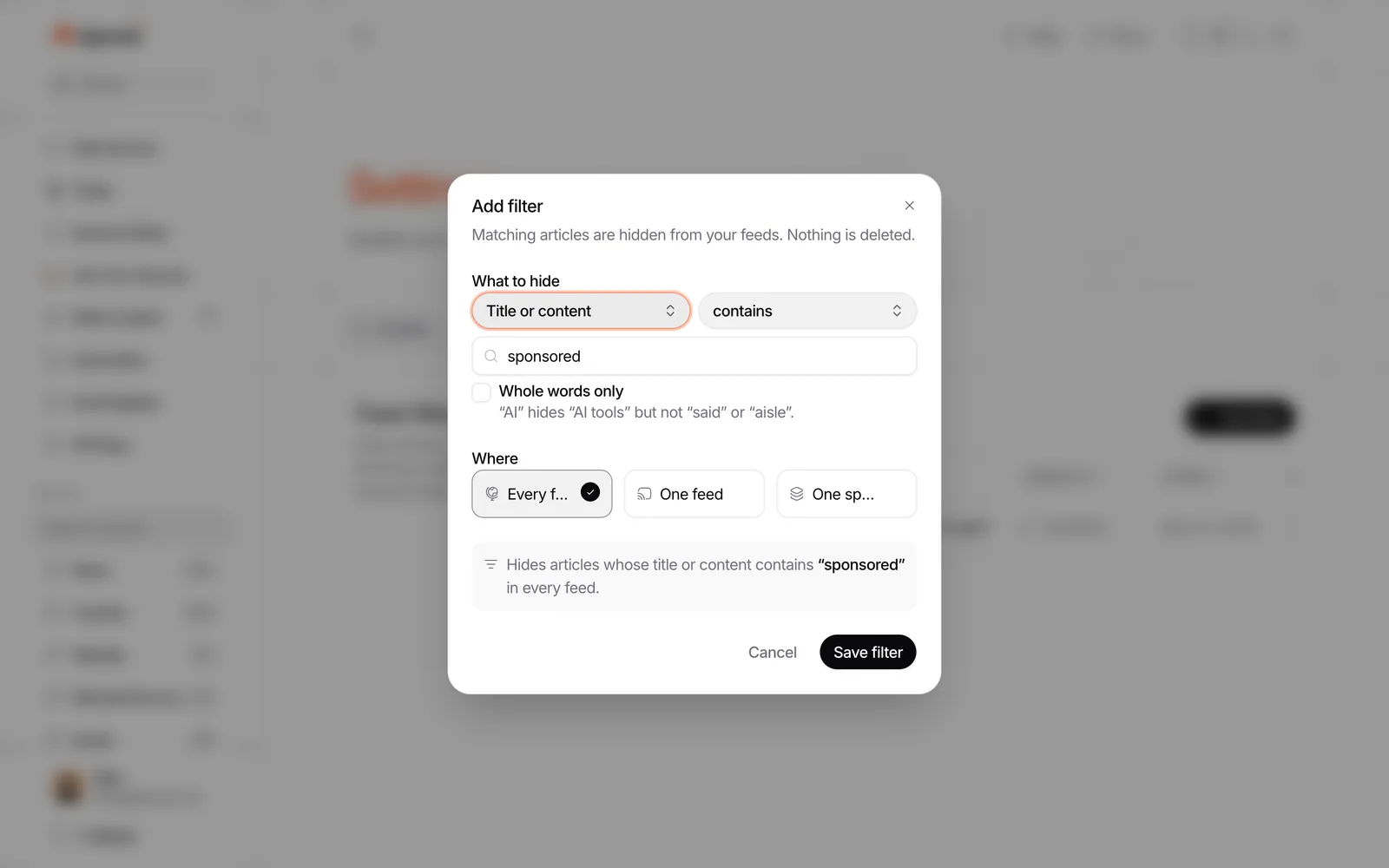
- Feed filters to hide recurring noise by keyword, author, link, or length
- AI summaries to get the key points of an article quickly
- Saved to Read as your running shortlist for the issue
- Search across everything your sources published when you need to check whether a topic already appeared this week
A practical weekly rhythm looks like this:
- Monday to Thursday: scan Today, save anything promising
- Friday morning: review Saved to Read
- Friday afternoon: choose the final links and write commentary
Feed filters matter more than most people expect. If a source publishes job posts, minor patches, sponsored notices, or repeated roundups you never include, hide them instead of deleting the source. That keeps your feed cleaner without losing access.
4. Pick by reader relevance, not just novelty
A curated newsletter is not a list of everything that happened. It is a selection. Your taste is part of the product.
A link deserves a place when it scores well on reader usefulness, not just on novelty.
Illustrative selection rubric
You can score each candidate from 0 to 2 on these five factors:
| Factor | 0 | 1 | 2 |
|---|---|---|---|
| Relevance | Off-topic | Adjacent | Directly useful to your readers |
| Timeliness | Old or already everywhere | Still live this week | New and worth knowing now |
| Substance | Thin, vague, promotional | Some useful detail | Original reporting, clear evidence, or meaningful update |
| Distinctiveness | Readers will see it everywhere | Somewhat overlooked | Easy to miss, strong signal, or unusually clear |
| Commentary potential | Nothing to add | Basic framing possible | You have a clear reason, implication, or caution to add |
A story with a total of 7 to 10 is usually shortlist material. A 5 might still make it if it rounds out the issue. A 0 to 4 is usually noise.
This method stops two common mistakes:
- picking stories just because they are big on social platforms
- filling space with items you cannot add anything useful to
5. Add one line of commentary per link
Your commentary is what makes a curated newsletter worth opening. It does not need to be long. One good sentence is enough.
Useful commentary usually does one of four things:
- explains why the link matters
- translates jargon into plain language
- points out a limit, tradeoff, or caveat
- connects the story to a trend your readers track
Here is a simple formula:
What happened + why it matters + what to watch next
Examples:
- The launch matters because it makes smaller teams able to do X without custom infrastructure.
- Worth reading for the numbers in the middle section, not the headline claim.
- This looks minor, but it changes how vendors in this category will price the feature.
If you want the writing side after curation, the follow-up article Write a newsletter with AI in your own voice covers how to draft without losing your style.
Do it with Repurai
Repurai helps with the hard part before writing: finding, narrowing, and understanding the material.
A simple workflow inside Repurai is:
- Add your sources by link, topic search, or import
- Group them into Spaces that match your newsletter sections
- Scan the Today view during the week
- Use summaries to triage
- Save strong candidates to Saved to Read
- On writing day, open the shortlist and turn each saved item into a short note in your newsletter draft
If you want a quick check on what your own sources said about a theme, use Ask your sources. For example, ask: What were the main product launches this week in my Top stories Space? Repurai answers from your sources only and cites the posts it used. That can help you spot overlaps or missed angles before final selection.
An illustrative weekly section template
Copy this into your newsletter draft and fill it from your shortlist.
Top stories
- [Link title] — What happened, why it matters, or the one caveat readers should know.
- [Link title] — Your one-line take.
- [Link title] — Your one-line take.
Tools and launches
- [Link title] — Who this is for and what changed.
- [Link title] — Why this is notable compared with the previous version or competing tools.
Research or data
- [Link title] — The key finding in plain English.
- [Link title] — What to be careful about before repeating the claim.
Worth your time
- [Link title] — A strong analysis, demo, interview, or thread that adds context.
This structure works especially well for weekly curated newsletters because it separates urgent news from slower context.
A small checklist you can reuse each week
Illustrative weekly curation checklist
- Review core sources where news breaks first
- Scan today's and this week's items in one place
- Hide repeated noise with filters
- Save promising items as you go
- Read summaries before opening everything in full
- Check original claims before quoting them
- Score final candidates for relevance and substance
- Keep only links you can explain in one sentence
- Group links into sections before writing the issue
Limits
This system does not work well if your source list is weak, too broad, or left untouched for months. You still need to prune sources and check original claims.
AI summaries help with triage, but they are not a substitute for verification. For YouTube videos, summaries depend on a public transcript being available. And if your niche depends heavily on private groups, paywalled reports, or direct messages, no public-source workflow will catch everything.
Some Repurai features depend on your plan, so if you need digests, webhooks, or API access, check /pricing.
FAQ
How many links should a curated newsletter include?
Enough to make the issue useful without turning it into a dumping ground. For most weekly curated newsletters, fewer strong links with commentary are better than a long list with no judgment.
How often should you check sources for a weekly newsletter?
A short daily scan is easier than a long weekly catch-up. Ten to fifteen minutes a day usually beats trying to process the whole week at once.
What is the best way to save links for a newsletter during the week?
Use one shortlist, not scattered tabs or notes. In Repurai, Saved to Read works well as the shortlist because you can save items during triage and review them together on writing day.
Start here: /signup