If you want to know how to follow your favorite blogs in one place, the short answer is: use one reader that collects updates from websites, newsletters, channels and forums for you. That gives you a direct list of new posts instead of hoping an algorithm shows them.
Most sites publish updates in a standard format behind the scenes. The old technical term is RSS, which is just a way for a site to list its latest posts so a reading app can pick them up. You do not need the technical side to use it. You just need a way to follow the source, group it by topic and check what is new once a day.
What to use instead of social feeds
A good setup does four things:
- follows websites directly
- includes more than blogs, like newsletters and YouTube channels
- lets you organise sources by topic
- makes today's new posts easy to scan fast
Here is a simple comparison:
| Option | Good for | Drawback |
|---|---|---|
| Browser bookmarks | Saving sites you like | You still have to remember to check each one |
| Email newsletters only | Writers who email reliably | Your inbox becomes the reading list |
| Social apps | Discovery | Algorithms bury posts from people you chose |
| One reader for all your sources | Keeping up on purpose | Needs a few minutes to set up |
How to find a site's updates
Many people get stuck here, but you usually have four easy options.
1. Paste the website into a reader
The easiest method is often to paste the blog home page into a reader that can detect the feed for you.
If you want the technical version, the feed URL is the link that points to the site's updates rather than an article page. If your reader supports direct detection, you can skip finding that link yourself.
2. Check common feed locations
Many blogs still use predictable feed links, especially on WordPress, Ghost and similar publishing systems. Common patterns include a site URL ending in /feed or a page source linking to RSS or Atom.
If you just need the feed link, Repurai has a free RSS Feed Finder that can help you check a site quickly.
3. Look for a newsletter or publication page
Some newsletters and publications on Substack, beehiiv, Medium or Ghost can also be followed from their public publication page, even if you normally read them by email.
4. Use the source URL for channels and forums
YouTube channels, subreddits, Hacker News pages, GitHub releases and similar sources can often be followed from the main public URL. For YouTube specifically, if you need the underlying feed link, use the free YouTube Channel Feed Finder.
Choose one place to follow all your sources
When you pick a reader, look for these basics:
- it can follow a source from a normal link, not only a feed URL
- it supports blogs plus the other places you actually read
- it has search
- it lets you save items for later
- it lets you organise sources by topic
Repurai fits this workflow well because you can add a source by pasting a link, searching a topic, or importing your list of sources from another reader. It supports YouTube channels, Substack, Medium, beehiiv, Ghost, WordPress and other blogs, any RSS or Atom feed, subreddits, Hacker News, GitHub releases and repositories, Google Scholar, arXiv, Bluesky and Mastodon, subject to what each platform makes publicly available.
Do it with Repurai
If you want a practical setup that works across blogs, newsletters, YouTube and Reddit, you can set it up in Repurai at repurai.com/signup.
1. Create a Space for each topic you follow
A Space is your container for a topic, client or project. Instead of one giant unread pile, make a few clear groups such as:
- AI research
- startups
- climate
- web development
- competitors
This is the step that keeps the system usable after week one.
2. Add sources from normal links or topic search
In Repurai, start by pasting the link to a blog, newsletter or YouTube channel. Repurai looks for the feed automatically and shows recent posts before you save it.
You can also search by topic, preview sources, then save several into a Space together.
3. Import your old reading setup if you already have one
If you are moving from another reader, you can bulk-import links or upload an OPML file, which is just your exported list of sources from another reading app such as Feedly or Inoreader.
That saves you from rebuilding everything by hand.
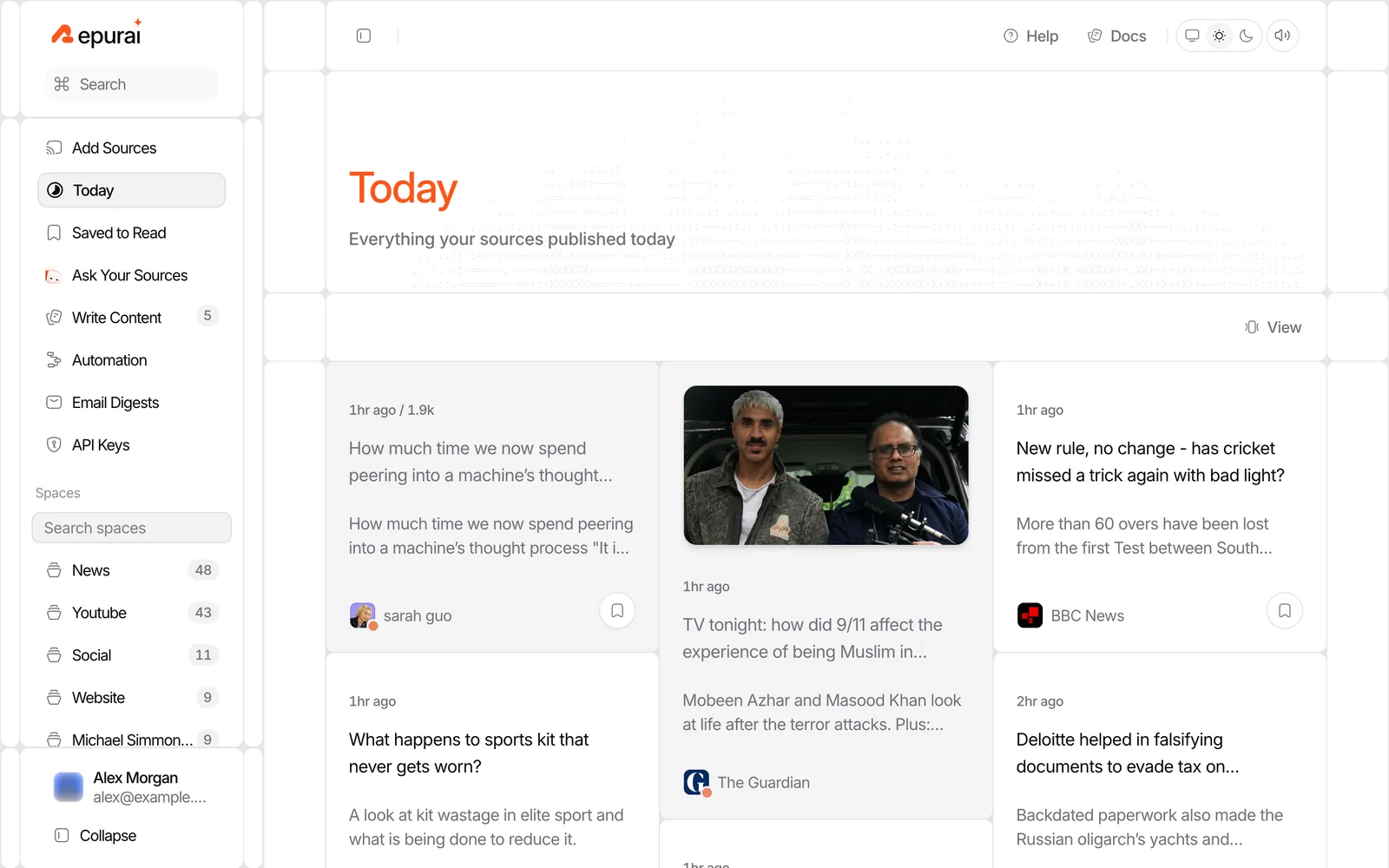
4. Check Today view once a day
Repurai checks your sources automatically about every hour, and you can also refresh manually. The Today view shows everything published today in your timezone, which is much easier than sorting by a general unread count.
This matters if your real question is not just how to follow your favorite blogs in one place, but how to notice what changed today without digging.
5. Save good items without breaking your flow
When something looks worth reading but not right now, save it to Saved to Read. That gives you a clean later list instead of leaving tabs open and forgetting why you opened them.
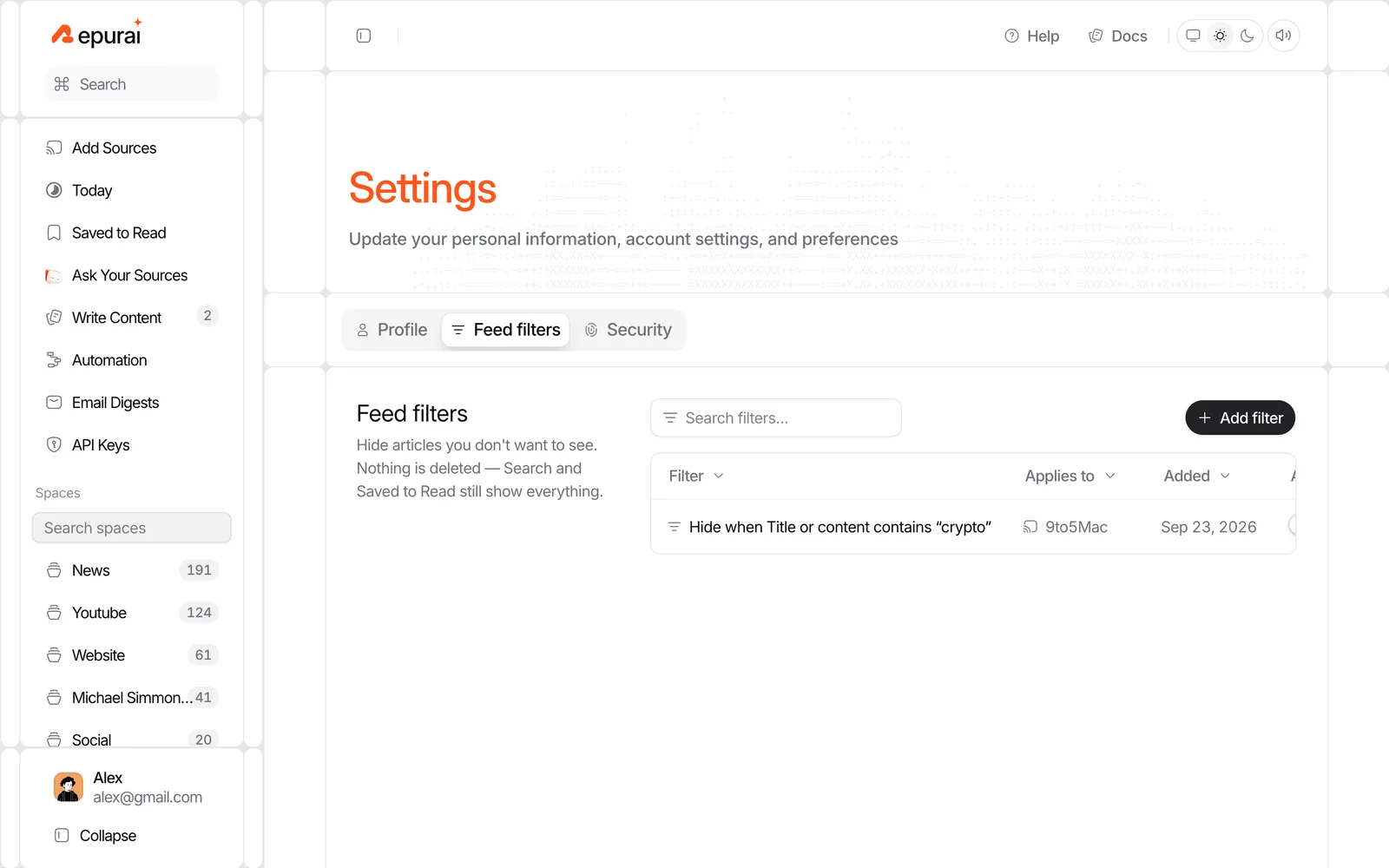
6. Filter noise instead of unfollowing good sources
Some sources post a mix of useful and irrelevant updates. If one blog publishes job posts, event notices or short link dumps you do not want, use feed filters to hide posts by keyword, author, link or length. You can apply filters everywhere, per Space or per source, without deleting the posts.
That keeps the source in your system without cluttering the view.
Organise by topic, not by website type
A common mistake is grouping sources as blogs, newsletters, YouTube and Reddit. That mirrors the platforms, not the way you think.
A better structure is topic first:
- Space: AI agents
- blogs
- Substack newsletters
- YouTube channels
- key subreddits
- Space: design tools
- founder blogs
- release notes
- product channels
- Space: competitors
- company blogs
- executives' public sources
- GitHub releases
This way, when you want to catch up on one subject, all formats are in one place.
In Repurai, one Space can hold a blog, a newsletter publication, a YouTube channel and a subreddit together. You can then read them in Card, Magazine, Article or List layouts, whichever makes scanning easiest.
A 15 minute daily reading routine
You do not need to read everything. You need a repeatable way to spot what matters.
Try this:
Minute 1 to 3: scan Today
Open Today view and look only at headlines and thumbnails.
Ask:
- What is new today?
- Which two or three items matter to my work?
- What can wait?
Minute 4 to 8: open only the strongest items
Read the posts that seem most relevant. If you are triaging quickly, Repurai can show AI summaries of articles, and YouTube videos can be summarised from their transcript when captions are available. That helps you decide what deserves full attention.
Summaries are for triage, not blind trust. Check the original source before you repeat a claim.
Minute 9 to 12: save the rest
Anything useful but not urgent goes into Saved to Read.
Minute 13 to 15: search one topic you care about
Use full-text search across all your followed sources for one keyword, company or trend. This is useful when you want to know whether several sources are all reacting to the same thing.
If you prefer not to open the app every day, email digests can send selected Spaces or feeds on your schedule with an AI-written overview at the top. For the basic setup steps, see the quick start at repurai.com/docs/quickstart.
Illustrative setup you can copy
Use this as a starting checklist.
Simple setup checklist
- Create 3 to 5 Spaces by topic
- Add 5 to 10 sources to each Space
- Mix formats inside each Space: blogs, newsletters, YouTube, Reddit
- Add one filter for recurring noise
- Check Today once each morning
- Save longer pieces to read later
- Review Saved to Read twice a week
Example Space: AI tools
Add:
- 3 company blogs
- 2 independent blogs
- 3 newsletters
- 4 YouTube channels
- 2 subreddits
- 1 GitHub releases feed
Routine:
- morning: Today view for 10 minutes
- afternoon: search one keyword such as a model or company name
- Friday: clear Saved to Read
When this does not work
There are limits.
- Some sites do not publish a public feed or make updates easy to follow.
- Paywalled articles may appear as headlines or links, but you still need your own access to read them.
- Some YouTube videos have no captions, so transcript-based summaries are not always available.
- A source that publishes too often can still overwhelm you if you do not filter or organise it.
- If your goal is discovery rather than keeping up with chosen sources, social platforms may still surface things you did not know to follow.
Why this setup lasts
The reason people give up is not that following blogs in one place is hard. It is that they build a system that creates one more pile.
A setup lasts when:
- adding a source takes seconds
- all formats live together by topic
- today's posts are separated from old backlog
- saving for later is easier than opening tabs
- filters remove repeat noise
That is the practical difference between a pile of links and a reading system.
If you want to set this up, start with one topic and one Space, then add sources as you read. You can try it at /signup.
FAQ
Can I follow newsletters in one place without using my inbox?
Often yes. Many public newsletters can be followed from their publication page as website updates, including sources on platforms such as Substack, beehiiv, Medium and Ghost.
How do I follow multiple YouTube channels in one place?
Use a reader that supports YouTube channels from the public channel URL. In Repurai, paste the channel link and save it into a Space with your blogs and newsletters.
What if I already use another reader?
Export your list of sources as an OPML file from the old reader, then import that file into the new one. In Repurai, you can also bulk-import normal links if that is easier.